Access Control Manager

Access Control Manager

by Golmar Sistemas de Comunicación, S.A.

Tools free
Android application Access Control Manager screenshot

Access Control Manager

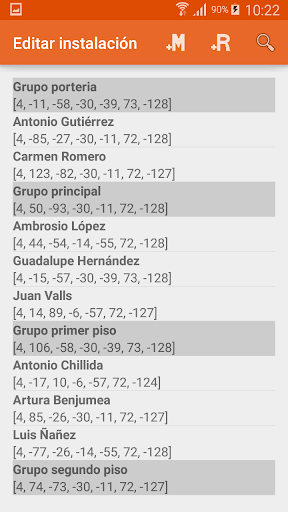
*The Access Control Manager app only works on smartphones which Android Beams is supported (Android 9.0 and below).By Access Control Manager app you can manage access cards that can open the door of your home or building.It is necessary to have the Golmar N4502 / NFC access kit or the EL4502 / NFC RF access module.You can create new installation and then edit the list of cards that can access, also relays that activates each card the same way you can manage the opening times of the relays R1, R2, R3 and transistor output 12 VDC panic P.To operate the mobile device you must have NFC on your device and Android version 4.4 or higher.Edit installation:Enable and disable Master and Resident cards to manage access to your home or building.
- Through Master cards you can enable / disable Resident Card and Installation on the plate.
- By Resident cards you can access your home or building.Communication with the board:It may transmit device data to the plate by NFC, if your device implements, bidirectionally.
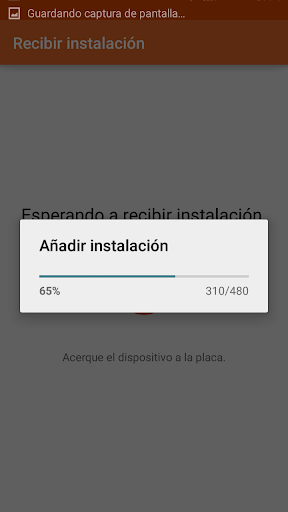
You can send data to the plate, receiving plate data and update an existing installation on the device.Ticketing:You will be able to register cards to define a number of accesses.
Once you have accessed with card access number configured it becomes unusable irreversibly.Visiting card:Store data such as name and / or contact phone number on the card.Link plate:You need to link the plate with the device to exchange data with it.
- First enable the card link on the plate you want to manage.
- Then press the option on the device and approaching the card to the device.
- Finally approach the link card to the plate, thus the device and the plate will be linked.OpenGoOpen the door of your home or building by OpenGo.
Active an access card and open the door of your house or building.

About Access Control Manager

Package name (App ID)
es.golmar.android.accesscontrollist
Available on
Google Play
Price
Free
Developer
Golmar Sistemas de Comunicación, S.A.

Looking for the Access Control Manager APK?

The safest way to get Access Control Manager (es.golmar.android.accesscontrollist) on your Android device is to install it directly from Google Play — you'll always get the latest official version, automatic updates, and no risk of modified or infected APK files from third-party sites.

Get it on Google Play
Features
🍽️

Food & Dining

Discover recipes and order food from your favorite restaurants.

🛍️

Shopping Features

Shop online and find the best deals.

📰

News & Updates

Stay informed with the latest news and updates.

Screenshots

See Access Control Manager in Action

Access Control Manager Screen 1
Access Control Manager Screen 2
Access Control Manager Screen 3
FAQ

Frequently Asked Questions

Is Access Control Manager free?

Yes, Access Control Manager is free to download and install on Android through Google Play.

How do I install Access Control Manager on Android?

Open Google Play on your Android phone or tablet, search for Access Control Manager by Golmar Sistemas de Comunicación, S.A. or tap the Google Play button on this page, then tap Install. The app downloads and installs automatically.

What is es.golmar.android.accesscontrollist?

es.golmar.android.accesscontrollist is the App ID (package name) of Access Control Manager on Google Play. Every Android app has a unique package name, and it is the safest way to verify you are installing the official app.

Is Access Control Manager safe to download?

Installing Access Control Manager from Google Play is the safest option: you get the official version published by Golmar Sistemas de Comunicación, S.A., verified by Google Play Protect, with automatic updates. Avoid APK files from unofficial third-party sites.

Access Control Manager

Get Access Control Manager Today

Access Control Manager for Android — free download on Google Play.

Get it on Google Play

Compatible with Android phones and tablets — available on Google Play.

Love this app?

Share it with friends and family on your favorite social network.

Ask AI about this app

Get instant answers about features, tips and more from popular AI assistants.